Clusters
The Clusters method transforms tabular data into synthetic grayscale or multi-channel images by first learning a latent representation with clustering- or density-based unsupervised techniques, and then reshaping that representation into square image matrices.
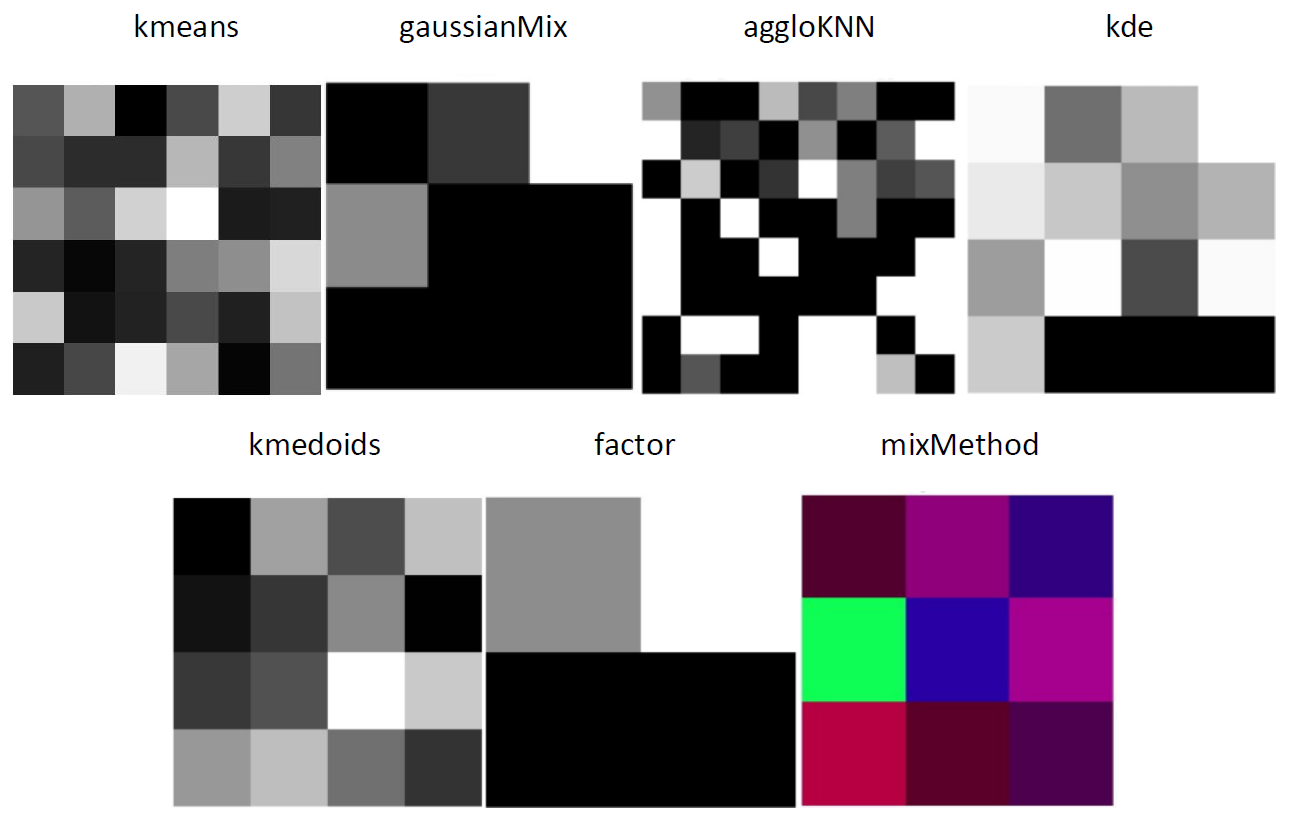
Import Clusters
To import Clusters model use:
>>> from TINTOlib.clusters import Clusters
>>> model = Clusters()
Hyperparameters & Configuration
When creating the Clusters class, some parameters can be modified. The parameters are:
Parameters |
Description |
Default value |
Algorithm |
Valid values |
|---|---|---|---|---|
|
The type of problem, defining how the images are grouped. |
None |
All |
[‘classification’, ‘unsupervised’, ‘regression’] |
|
Parameter kept in the constructor for API compatibility. In this implementation it is accepted as input, but it is not used in the call to the parent class constructor. |
None |
All |
[True, False] |
|
Show execution details in the terminal. |
None |
All |
[True, False] |
|
Algorithm / technique used to generate the latent representation that is later converted into an image. |
‘kmeans’ |
All |
[‘kmeans’, ‘gaussianMix’, ‘aggloKNN’, ‘mixMethod’, ‘kde’, ‘kmedoids’, ‘factor’] |
|
Number of clusters or latent components used to represent the data. The image side is computed from the square root of this value, rounded up when necessary. It can also be |
16 |
[‘kmeans’, ‘gaussianMix’, ‘aggloKNN’, ‘mixMethod’, ‘kmedoids’, ‘factor’] |
integer, |
|
Seed for reproducibility. |
1 |
All |
integer |
|
Number of initializations for the |
‘auto’ |
[‘kmeans’, ‘gaussianMix’, ‘mixMethod’] |
integer or ‘auto’ |
|
Maximum number of iterations for |
300 |
[‘kmeans’, ‘gaussianMix’, ‘mixMethod’, ‘kmedoids’] |
integer |
|
Variant of the k-means algorithm used by |
‘lloyd’ |
[‘kmeans’, ‘mixMethod’] |
[‘lloyd’, ‘elkan’] |
|
Covariance type used by the Gaussian Mixture model. |
‘full’ |
[‘gaussianMix’, ‘mixMethod’] |
[‘full’, ‘tied’, ‘diag’, ‘spherical’] |
|
List of methods used when |
[] |
[‘mixMethod’] |
[‘kmeans’, ‘gaussianMix’, ‘aggloKNN’, ‘kmedoids’, ‘factor’] |
|
Bandwidth used in kernel density estimation. |
1.0 |
[‘kde’] |
float |
|
Kernel type used by the KDE algorithm. |
‘gaussian’ |
[‘kde’] |
[‘gaussian’, ‘tophat’, ‘epanechnikov’, ‘exponential’, ‘linear’, ‘cosine’] |
|
Distance metric used by |
‘euclidean’ |
[‘kde’, ‘aggloKNN’, ‘kmedoids’, ‘mixMethod’] |
For |
|
If True, transforms the distances to k-means centroids with an RBF function before image generation. |
False |
[‘kmeans’, ‘mixMethod’] |
[True, False] |
Code example:
>>> model = Clusters(
...     problem='classification',
...     algorithm='kmeans',
...     n_clusters=25,
...     random_seed=1,
...     max_iter=300,
...     RBFKmeans=True
... )
All the parameters that aren’t specifically set will have their default values.
Algorithm Notes
The class supports several internal strategies to build the representation that is later reshaped into an image:
kmeans:Uses the distances from each sample to the cluster centroids. Optionally, these distances can be transformed with an RBF kernel before image generation.
gaussianMix:Uses the posterior probabilities returned by a Gaussian Mixture Model.
aggloKNN:First applies Agglomerative Clustering with a k-nearest-neighbors connectivity graph, and then trains a KNN classifier on the resulting pseudo-labels to obtain class probabilities.
kde:Estimates a one-dimensional kernel density distribution for each feature and uses the density values as the transformed representation.
kmedoids:Uses distances from each sample to the learned medoids obtained through a PAM-like procedure.
factor:Uses the latent representation obtained from Factor Analysis.
mixMethod:Combines up to three different methods into a 3-channel image. Each selected method fills one channel.
Additional constraints:
mixMethodrequiresensamMethodto contain between 1 and 3 non-repeated methods.kdeandaggloKNNdo not support automatic cluster selection withn_clusters='auto'or a list of candidate values.If
factoris used, the number of clusters/components must be smaller than the number of features minus one.In grayscale mode,
kmeansandkmedoidsreorder the transformed features according to centroid/medoid proximity before reshaping them into the image.In multi-channel mode, if fewer than three channels are provided, the remaining channels are filled with zeros.
Functions
Clusters has the following functions:
Function |
Description |
Output |
|---|---|---|
|
Allows to save the defined parameters. |
.pkl file with the configuration |
|
Load Clusters configuration previously saved with
|
|
|
Trains the model on the tabular data. Depending on the selected algorithm, this step learns centroids, medoids, Gaussian mixture components, factor projections, KDE distributions, or multi-channel representations.
|
|
|
Generates and saves synthetic images in a specified folder using the representation learned during fitting.
|
Folders with synthetic images |
|
Combines the training and image generation steps. Fits the model to the data and generates synthetic images in one step.
|
Folders with synthetic images |
The model must be fitted before using the
transformmethod. If the model isn’t fitted, aRuntimeErrorwill be raised.